
BusyBox; The Swiss Army Knife of Embedded Linux
BusyBox; The Swiss Army Knife of Embedded Linux
In today’s article, we are going to cover one of the most used tools in Embedded Linux “BusyBox”, we will cover the following topics.
- What is BusyBox ?
- The design of Busybox.
- How to configure and build it ?
- License and lawsuits
- ToyBox the BusyBox alternative
- Resources
So, Lets get started …
1. What is BusyBox ?
- If you ever used a Desktop Linux before, you usually use command line tools on the terminal like “cat, grep, find, mv, sleep, wc, vi, which, md5sum,…etc“ each of these commands is a stand-alone binary built from a different project, most of them are collected under the GNU project umbrella[1], some are individual projects and some are distribution specific.
- Also, you need an Init program; which is the first program executed by the kernel after booting, and it’s a demon processes, So it’s up tell the system is shutdown, and it creates all other processes.
- And of course, all of the commands and scripts are executed on a shell, like Bash.
All these components are not designed for embedded, so they have a lot of features and take too much storage…
BusyBox; Is a software project that provides a stripped-down version of all these tools and utilities, compiled into a single binary, with the option to configure those tools, to add or remove features.
It’s very common in embedded and created 1995 as a rescue disk that fits, literally on a floppy disk 1.44MB ( The save button for the newer generations :D)
2. The design of BusyBox.
- Having a single binary executable was a very smart approach, all the programs shares only one ELF header, and can easily share code between different apps hence a smaller overall size.
- This single binary can act like many different programs depending on the name used to invoke it, usually every name has a symbolic link pointing to the same BusyBox binary, and since in Linux when you call a program, the first param passed to it (argv[0]) is the name of the program, BusyBox binary acts according to that name.
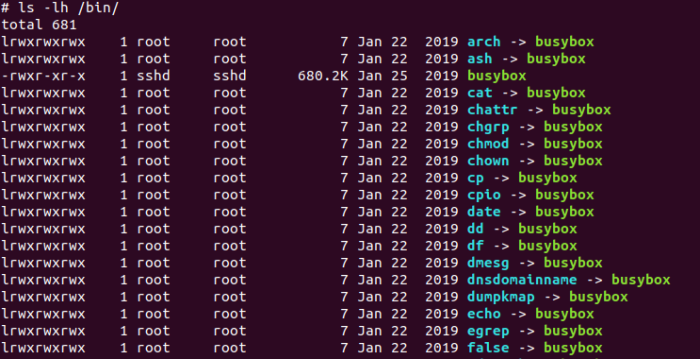
- Choose only the needed utilities; BusyBox uses the famous menuconfig tool to select only the commands you need to be in the final binary.
- Reduce the feature set for each command; for example the embedded user will not need a fully featured “VI” text editor, or the “ls” command to sort the output and so on, you can also finetune some of these features from menuconfig.
- You can also choose to link statically or dynamically with some C-library to reduce the size also you can link with glibc or uClibc (saves you almost half of the binary size)
The table bellow compares the lines of code vs the features implemented for both the desktop version and BusyBox.
Note; The size of the BusyBox binary with all the programs is 1.1MB, while the total size of /bin only on my desktop is almost 600 MB (not a very fair comparison, but you got the idea .. ) :
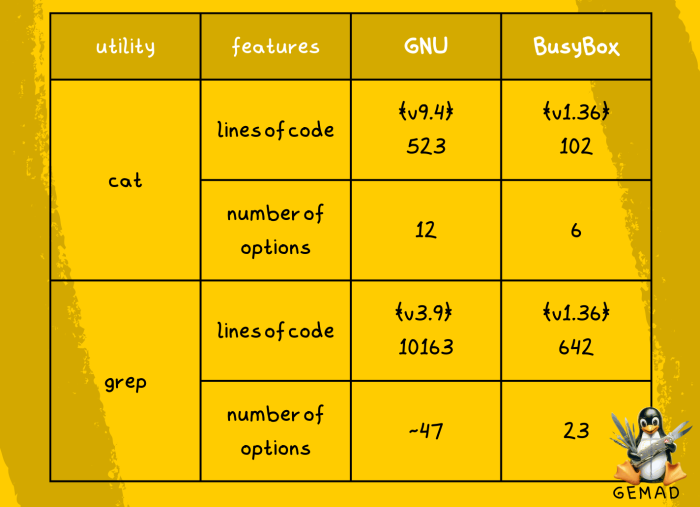
grep adds 8.6kb to busybox, while full grep binary is 1.3M
- You can also choose to link statically or dynamically with C-library to reduce the size also you can choose which clibarary to link with; glibc or uClibc.
3. How to configure and build it ?
As we discussed BusyBox make use of the kernel menuconfig tools to configure the build.
Building from source code.
1.To build From the source you need first to install ncurses library needed to open the configuration menu :
sudo apt-get install libncurses5-dev libncursesw5-dev
2.fetch the source code from the official website https://busybox.net/
wget https://busybox.net/downloads/busybox-1.36.1.tar.bz2
3. uncompress the archive
tar xvf busybox-1.36.1.tar.bz2 cd busybox-1.36.1
4. Configure it by running menuconfig, and we will not modify the default build, so it will be built for our desktop, so we can test it, just press “Esc” and then “Enter” to choose to save the config
make menuconfig
5- Run make to build it
make
6 — After the build is completed, you can run the binary and see what are the available commands
./busybox
So, if you run
./busybox –list | wc -l ls -lh busybox
You will see that 402 tools/command are available is this version with default configuration and the total size is 1.1MB.
Configure and rebuild
Lets remove the some commands from the binary and see if they are removed, check first what are there
./busybox –list
1. Enter the menuconfig
make menuconfig
2. To search for something press “/” on the keyboard, then press enter:
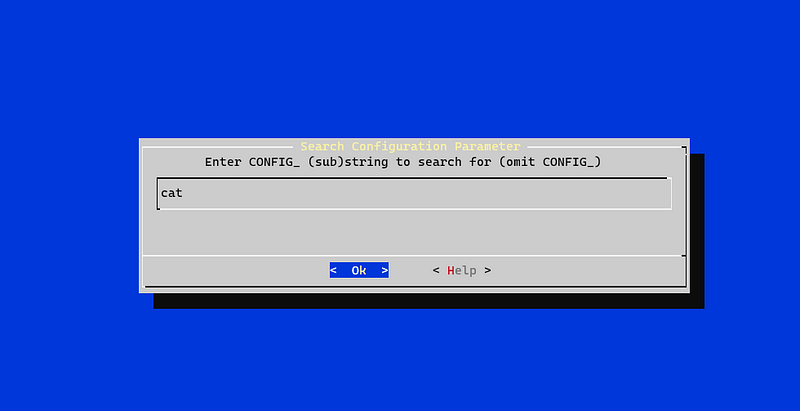
You will see that, it exists under coreutils
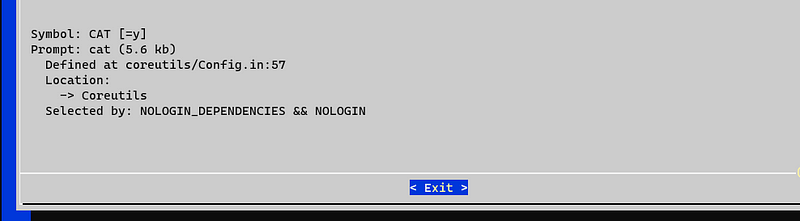
Note: modern menuconfig supports jumping to the option by pressing a number, but BusyBox uses an old version which doesn’t support that feature so you need to navigate manually.
3. Esc and navigate to the cat option, use space to toggle the option
Removing “cat” will save us 5.6kb


4. Repeat for “grep”, “find”, “awk”, “vi” and “sed” (to notice the difference in size)
5- repeat the save, exist and built steps
6- Try some of the removed commands
./busybox cat cat applet not found
And the binary size is reduced a little bit ~1MB, you can remove as many tools as you can to optimize for size.
Configuring and building using Buildroot or YOCTO.
For embedded systems, most likely you will be using a build system to generate your image, the steps are quite the same for configuration and the steps for build and testing the full image is related to each build system and the target and not covered here.
- Buildroot
make busybox-menuconfig make
- YOCTO
bitbake busybox -c menuconfig bitbake busybox
4. License and lawsuits
BusyBox Uses GNU GPLv2, which :
- Requires derivative works to be released under the same license
- Programs linked with a library released under the GPL must also be released under the GPL
BusyBox is known for actively prosecuting violations of the terms of its license, there are alot of lawsuites, which concluded either by making the company publish their code to opensource, like what happened with Samsung SamyGO smart tv OS, Or also paying undisclosed amount of money for the founders like what happened with Monsoon Multimedia Inc
Check my Article on Open-Source Licenses Made Easy with Buildroot and Yocto for Embedded Linux for more stories and how the license system work.
5. ToyBox the BusyBox alternative
Started in early 2006 by the maintainer of BusyBox Rob Landley after stepping down from maintaining it, ToyBox provides the same functionality, but with a more relaxed opensource license BSD, Toybox is used for most of Android’s command-line tools in all currently supported Android versions.
Conclusion
In this article we covered BusyBox, how it’s designed to be optimized for embedded targets, and how to configure and build it in many different ways, we also covered the license and limitations, which led to the development of ToyBox, I hope you enjoyed the article, please leave a comment for any correction or suggestions.
6.Resources
[1]https://www.gnu.org/software/#allgnupkgs [2]https://www.micsymposium.org/mics_2004/ThayerMiller.pdf [3]https://en.wikipedia.org/wiki/BusyBox [4]https://en.wikipedia.org/wiki/Toybox [5]https://busybox.net/FAQ.html [6]https://bootlin.com/training/embedded-linux/


